Log #11 · Sep 27, 2026
How Ultrasonic Distance Sensors Work (HC-SR04)
The physics behind the HC-SR04, how to wire it to an Arduino, code that converts echo time to centimeters, and how to get stable readings.
The HC-SR04 is the two-eyed sensor you see on countless beginner robots. It measures distance by shouting and listening for the echo, the same trick bats use. It costs very little, works from about 2 cm to 4 m, and needs only two Arduino pins. This guide explains how it works, how to wire it and how to turn its signal into a reliable distance.
How it measures distance
The two round "eyes" are a small speaker and a microphone for ultrasound at 40 kHz, far above human hearing.
- Your Arduino sends a short pulse to the TRIG pin.
- The sensor fires a burst of eight ultrasonic pulses.
- The sound bounces off an object and returns to the receiver.
- The ECHO pin goes HIGH for exactly as long as the round trip took.
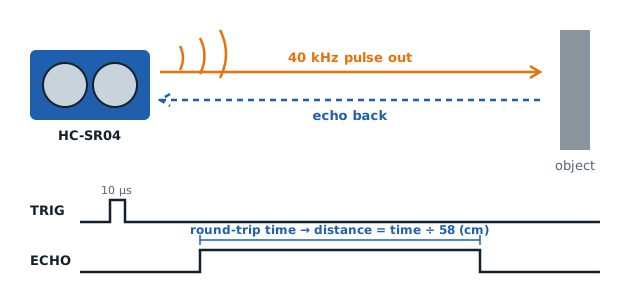
Sound travels through air at about 343 m/s at 20 °C, which is 0.0343 cm per microsecond. Because the sound goes to the object and back, you divide by two:
distance (cm) = echo time (µs) × 0.0343 ÷ 2
A handy shortcut: divide the echo time in microseconds by 58 to get centimeters. An echo of 580 µs means the object is about 10 cm away.
Wiring
| HC-SR04 pin | Arduino Uno |
|---|---|
| VCC | 5 V |
| TRIG | Pin 9 |
| ECHO | Pin 10 |
| GND | GND |
The standard HC-SR04 runs at 5 V. On a 3.3 V board like the ESP32, look for the HC-SR04P or RCWL-1601 versions that work at 3.3 V, or put a voltage divider on the ECHO line so its 5 V output does not reach the 3.3 V pin.
The code
const int TRIG = 9;
const int ECHO = 10;

void setup() {
  Serial.begin(9600);
  pinMode(TRIG, OUTPUT);
  pinMode(ECHO, INPUT);
}

float readDistanceCm() {
  digitalWrite(TRIG, LOW);
  delayMicroseconds(2);
  digitalWrite(TRIG, HIGH);       // 10 µs trigger pulse
  delayMicroseconds(10);
  digitalWrite(TRIG, LOW);

  unsigned long us = pulseIn(ECHO, HIGH, 30000);  // time out after 30 ms
  if (us == 0) return -1;         // no echo: nothing in range
  return us / 58.0;
}

void loop() {
  float cm = readDistanceCm();
  if (cm < 0) Serial.println("Out of range");
  else { Serial.print(cm, 1); Serial.println(" cm"); }
  delay(100);
}
pulseIn() waits for the ECHO pin to go HIGH and returns how many microseconds it stayed HIGH. The third argument is a timeout: 30 000 µs corresponds to roughly 5 m, beyond the sensor's range. Without it, the program can freeze for a full second when nothing reflects back.
Getting stable readings
Raw readings jump around a bit. Three practical fixes:
- Wait between pings. Fire no more often than every 60 ms, so echoes from the previous ping do not confuse the next one.
- Use the median of several readings. Take five readings, sort them and use the middle one. A single wild value then has no effect.
- Mount it rigidly and keep the eyes clear of the chassis edge, which can create false echoes.
Here is a simple median filter:
float medianDistance() {
  float r[5];
  for (int i = 0; i < 5; i++) { r[i] = readDistanceCm(); delay(60); }
  for (int i = 0; i < 4; i++)            // tiny bubble sort
    for (int j = 0; j < 4 - i; j++)
      if (r[j] > r[j + 1]) { float t = r[j]; r[j] = r[j + 1]; r[j + 1] = t; }
  return r[2];
}
What it struggles with
Ultrasound reflects best from flat, hard surfaces facing the sensor. Expect trouble with:
- Soft materials like curtains, cushions and clothing, which absorb sound
- Angled surfaces, which bounce the echo away from the receiver
- Thin objects like chair legs, which reflect too little sound
- Very close objects under about 2 cm
The sensor's beam is roughly a 15° cone, so it detects obstacles slightly off to the side too. That is useful for robots, but it means the sensor cannot tell you exactly where in the cone the object is.
Temperature correction
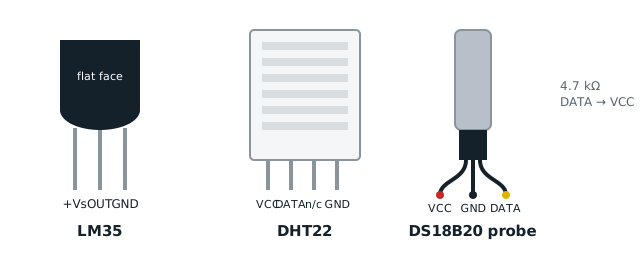
The speed of sound changes with air temperature, by about 0.6 m/s per °C. At 35 °C sound travels around 352 m/s, so readings drift by a few percent. For most robots this does not matter. For accurate measuring, read the temperature with one of the sensors in our temperature sensor comparison and use:
speed (m/s) ≈ 331.3 + 0.606 × temperature (°C)
Where to use it
The HC-SR04 is ideal for obstacle detection, parking aids and water-level sensing in tanks (see the water tank level monitor project). It is the main sensor in our obstacle-avoiding robot project, and its distance readings are a great input for experimenting with PID control, for example a robot that holds a fixed distance from a wall.
— TheSolderBench · found a mistake? tell me