Log #110 · Nov 16, 2026
Mecanum Wheels Explained: How Robots Drive Sideways
How mecanum wheels let a four-wheeled robot move sideways and diagonally, how to mount the left and right wheels correctly, the simple mixing equations for forward, sideways and rotation, and Arduino code for two motor drivers.
A normal robot car can drive forward, backward and turn. A robot on mecanum wheels can also slide sideways, move diagonally and spin while traveling in any direction, all without steering. It looks like magic the first time you see it. The trick is in the angled rollers around each wheel and in how you combine the four motor speeds. This guide explains both and gives you working code.
How a mecanum wheel works
Around the rim of a mecanum wheel sit small free-spinning rollers, angled at 45° to the wheel's axle. When the wheel turns, the roller touching the ground can't push straight forward, because the roller is free to spin on its own axis and simply rolls away in that direction. The only push it can deliver is along the roller's axis, at 45°.
So each wheel pushes the robot diagonally. Add the four diagonal pushes together:
- All four wheels forward: the sideways parts cancel, the forward parts add up. The robot drives forward.
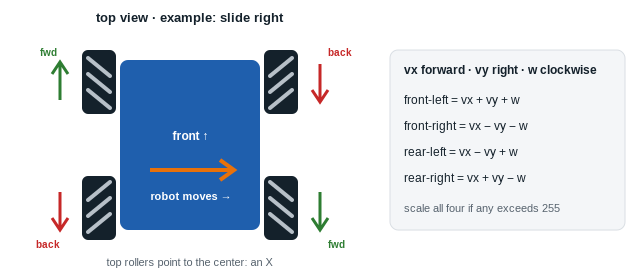
- Left-front and right-rear forward, the other two backward: the forward parts cancel, the sideways parts add up. The robot slides sideways.
- Left side forward, right side backward: the robot spins in place, like a differential drive robot.
Left and right wheels: mounting them correctly
Mecanum wheels come in two mirror-image types, often marked A and B or L and R. A set of four contains two of each. Getting them in the right corners is the most common problem with new mecanum robots.
The rule: look down at the robot from above. The rollers you can see on top of each wheel should point toward the center of the robot, so together the four wheels form an X.
In practice the front-left and rear-right wheels are one type and the front-right and rear-left wheels are the other. If your robot drives forward fine but turns or barely moves when it should slide sideways, the wheels are swapped: exchange them left to right.
The mixing equations
You choose three things:
- vx: forward speed (positive = forward)
- vy: sideways speed (positive = to the right)
- w: rotation speed (positive = turn clockwise, to the right)
Each wheel's speed is then:
| Wheel | Speed |
|---|---|
| Front-left | vx + vy + w |
| Front-right | vx − vy − w |
| Rear-left | vx − vy + w |
| Rear-right | vx + vy − w |
Check it: for a pure slide to the right (vx = 0, vy = 1, w = 0) you get front-left +1, front-right −1, rear-left −1, rear-right +1, the pattern described above. Any mix works: vx = 1 and vy = 1 drives diagonally forward-right; vx = 1 and w = 0.3 drives forward while curving right.
If any wheel's result is bigger than the motor's maximum, scale all four down by the same factor, so the direction of motion stays correct.
Hardware
- Four DC gear motors, all the same model, so their speeds match.
- Two dual motor drivers. Two TB6612FNG boards are ideal: small, efficient and each controls two motors with one PWM and two direction pins per motor (see L298N vs TB6612FNG).
- A rigid chassis. All four wheels must touch the floor at the same time; a frame that twists lifts one wheel and spoils sideways motion. More on frames in the robot chassis guide.
- A battery that can supply four motors starting at once, for example a 2S Li-ion pack.
Wiring (two TB6612 boards)
| Motor | PWM pin | Direction pins |
|---|---|---|
| Front-left | D3 | D2, D4 |
| Front-right | D5 | D7, D8 |
| Rear-left | D6 | A0, A1 |
| Rear-right | D9 | A2, A3 |
Connect each board's STBY pin to 5V, VM to the battery, VCC to the Arduino's 5V, and all grounds together. The analog pins A0–A3 work as normal digital outputs.
The code
// Front-left, front-right, rear-left, rear-right
const int PWM[4] = {3, 5, 6, 9};
const int IN1[4] = {2, 7, A0, A2};
const int IN2[4] = {4, 8, A1, A3};
const int FL = 0, FR = 1, RL = 2, RR = 3;

void setMotor(int m, int speed) {          // -255 .. 255
  speed = constrain(speed, -255, 255);
  digitalWrite(IN1[m], speed > 0);
  digitalWrite(IN2[m], speed < 0);
  analogWrite(PWM[m], abs(speed));
}

// vx: forward, vy: right, w: clockwise. Each from -255 to 255.
void mecanumDrive(int vx, int vy, int w) {
  long s[4];
  s[FL] = (long)vx + vy + w;
  s[FR] = (long)vx - vy - w;
  s[RL] = (long)vx - vy + w;
  s[RR] = (long)vx + vy - w;

  long biggest = 255;                      // scale down if any wheel exceeds 255
  for (int i = 0; i < 4; i++) biggest = max(biggest, labs(s[i]));
  for (int i = 0; i < 4; i++) setMotor(i, s[i] * 255 / biggest);
}

void setup() {
  for (int i = 0; i < 4; i++) {
    pinMode(PWM[i], OUTPUT);
    pinMode(IN1[i], OUTPUT);
    pinMode(IN2[i], OUTPUT);
  }
  delay(2000);
}

void loop() {
  mecanumDrive(150, 0, 0);    delay(1000);   // forward
  mecanumDrive(0, 150, 0);    delay(1000);   // slide right
  mecanumDrive(-150, 0, 0);   delay(1000);   // backward
  mecanumDrive(0, -150, 0);   delay(1000);   // slide left
  mecanumDrive(0, 0, 120);    delay(800);    // spin clockwise
  mecanumDrive(120, 120, 0);  delay(1000);   // diagonal forward-right
  mecanumDrive(0, 0, 0);      delay(2000);   // stop
}
Testing step by step
- Lift the robot so the wheels spin freely. Run
mecanumDrive(150, 0, 0)and check that every wheel spins forward. Reverse the wires of any motor that spins backward. - Put it on the floor and drive forward. It should go straight. If it curves, one motor is weaker or one wheel doesn't touch the ground.
- Test the slide. If it rotates instead of sliding, the wheels are in the wrong corners (swap left and right types).
- Test rotation, then diagonals.
Things to know
- Surface matters. Mecanum wheels work best on hard, flat floors. On thick carpet the rollers sink in and sideways motion becomes slow and inaccurate.
- Sideways is usually slower and less precise than forward in practice, because the rollers slip more during a slide and it needs more traction.
- Small speed differences between motors make the robot drift during slides. For precise motion, add wheel encoders and a speed controller for each wheel, or an IMU to hold the heading.
- Rollers must spin freely. Dirt or hair in a roller makes the robot pull to one side.
Troubleshooting
- Slides the wrong way: vy sign flipped. Check that each motor spins forward with a positive speed first.
- Rotates when it should slide: wheel types are in the wrong corners.
- One corner lifts or the robot rocks: the chassis flexes; add a stiffer plate or a suspension pivot on one axle.
- Robot stops when all motors start: battery or driver can't supply the combined start-up current.
— TheSolderBench · found a mistake? tell me